Environments and presets
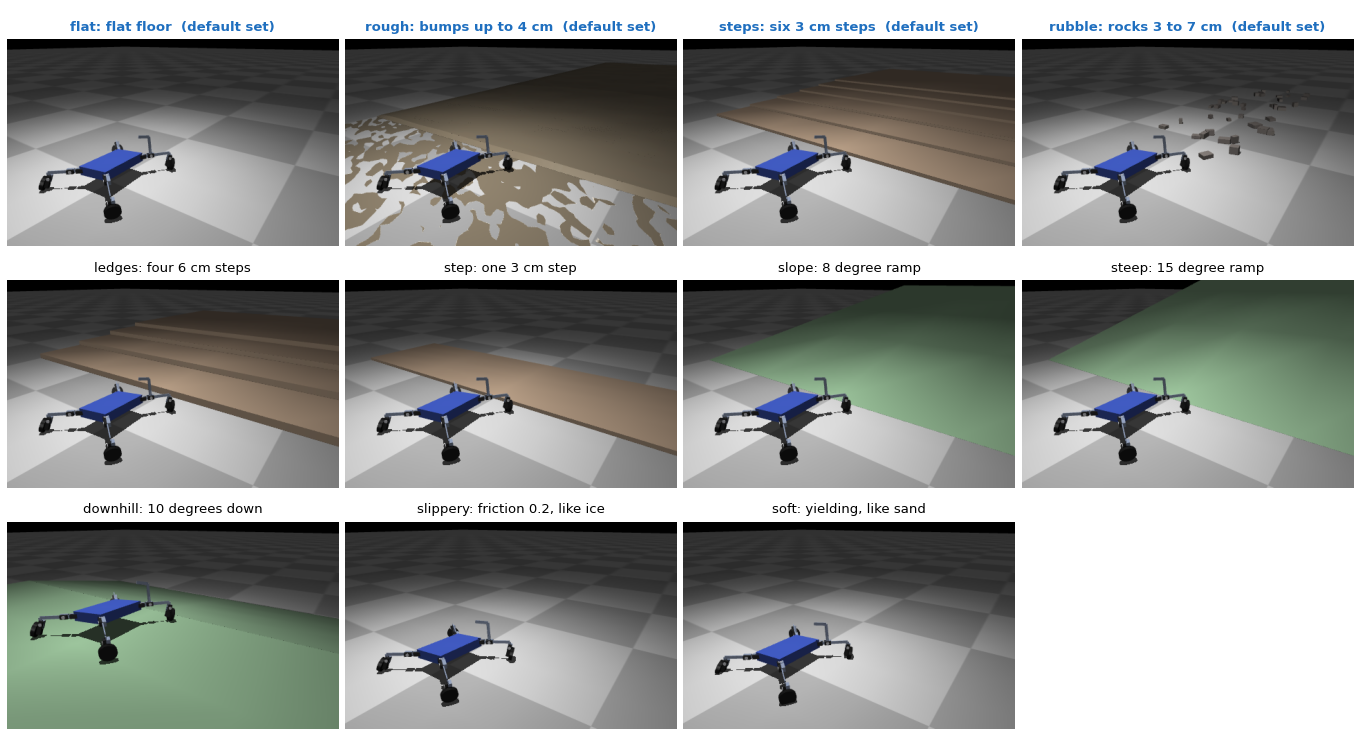
Unless a run says otherwise, the robots shown in this documentation were
trained on the default set: flat floor, bumps, low steps and rubble (terrain).
Every robot is scored on each environment of the run, and its fitness mixes the
average with the worst one (0.7 * mean + 0.3 * min), so the search favours
robots that cope with all of them. Pick the environments with --terrains:
python experiments/train.py --terrains rubble            # one environment only
python experiments/train.py --terrains flat,soft,steep   # your own list
python experiments/train.py --terrains terrain           # a ready set (below)
Fewer environments make a specialist (the best robot for sand, or for a
staircase); more make a generalist. The choice is saved in the archive, so
replay, validate and export use the same ones.
| Name | What the robot faces |
|---|---|
flat |
flat floor |
rough |
smoothed random bumps up to 4 cm, flat near the spawn |
rubble |
40 scattered rocks 3 to 7 cm high, taller than many wheels can climb |
steps |
six low steps, 3 cm high and 50 cm deep, the first at x = 0.6 m (see below) |
ledges |
staircase of four 6 cm steps, too tall to roll up |
step |
one 3 cm step, 0.50 m ahead of the spawn, 1 m deep |
slope |
8 degree ramp up from x = 0.5 m |
steep |
the same ramp at 15 degrees |
downhill |
spawn on a plateau, then a 10 degree slope down to the floor |
slippery |
floor with friction 0.2, like ice |
soft |
yielding floor like sand: feet sink 1 to 2 cm and wheels feel rolling drag |
How hard steps is. It is not a house staircase: each step is 3 cm high
(a house step is 17 to 18 cm, taller than most of these robots) and 50 cm deep.
In an 8 s episode a good robot covers 1.5 to 2.3 m, so it meets the first two to
four steps, at x = 0.6, 1.1, 1.6 and 2.1 m. A wheel climbs an edge up to about
its own radius, and wheels here are 30 to 60 mm, so a low robot on wheels rolls
up a 3 cm step; a low body without wheels can push its torso over the edge like
a sled. Robots trained only on flat ground still mostly stall there. ledges
doubles the height to 6 cm, too tall to roll up.
Ready sets:
| Set | Environments |
|---|---|
flat |
flat |
terrain |
flat, rough, steps, rubble |
all |
all of the above except step |
rough and rubble are random. Training draws new bumps and rocks for every
body, so a family of robots cannot memorise one layout; replay and validate
use one fixed layout, so a robot always meets the same ground there.
Make your own environment
An environment is a function in darwinbot/terrain.py that returns a
Terrain: a name, the MuJoCo XML of the world (boxes, cylinders, meshes,
anything MuJoCo loads), the ground friction and the ground height at the spawn.
Add it to TERRAINS and train on it:
python experiments/train.py --terrains tunnel          # only the new one
python experiments/train.py --terrains flat,tunnel     # mixed with others
Evolution then keeps the bodies and gaits that do best there. A few things decide whether the result is what you expect:
- Episodes are short. Each test lasts 8 s and good robots cover about 1.5 m, so the challenge has to sit within the first metre or two after the spawn (x = 0, robots head towards +x).
- The score stays the same. It rewards distance along x, turning when told
to, low energy and not falling. A tunnel rewards going through it forwards;
reaching a goal or solving a maze would need a new task in
fitness.py, and the robots have no sensors to find their way. - A fixed layout gets memorised. With every object always in the same
place, evolution learns that one layout. Draw the layout from a seed, as
roughandrubbledo, so every body meets a new one. - The map is still measured on flat ground. The archive's axes (contact time, height, legs, cost of transport) come from the flat floor; a new environment changes the fitness, not how robots are sorted.
- Contacts cost time.
rubblehas 40 rocks; hundreds of objects can make training several times slower. - The world can touch the robot at the spawn. The spawn check only looks for parts of the robot touching each other, so a ceiling lower than a body pins it in place, which in practice filters tall bodies out.
Tasks and presets
The ready-made tasks and the --preset option are described in Fitness and tasks.